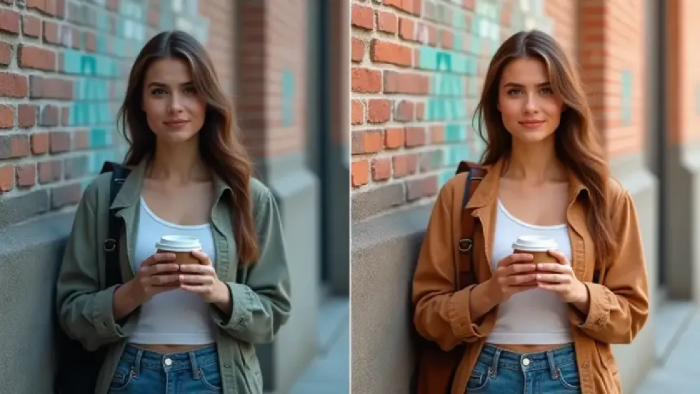
A product photo on a plain white background serves a practical purpose. Place that same product on a warm wooden kitchen counter, add soft morning light, and include a half-read book nearby, and it becomes a lifestyle image that can create a stronger emotional connection with shoppers.
Lifestyle product images can increase conversions by 15% to 30% compared with white-background-only listings. However, traditional lifestyle photography can cost $20 to $150 or more per image and often requires a studio, props, a photographer, and days of production time. AI image-to-image tools have changed that equation. Costs can now range from $0.03 to $2.99 per image, with many ecommerce teams reporting 80% to 95% lower production costs.
The real challenge is choosing a tool that delivers realistic, consistent results at scale rather than impressive outputs that struggle in real-world production.
Before comparing different tools, it is important to understand what separates a ‘lifestyle image’ from a ‘standard product photo.’ AI platforms approach this transformation with different capabilities and priorities.
A lifestyle image places a product within a believable real-world setting. The scene may include a specific surface, natural or diffused lighting, relevant props, and enough environmental depth to make the space feel authentic.
The biggest challenge is making the product look as though it was actually photographed in that environment. Lighting and shadows play a major role. If a product captured under flat studio lighting is placed into a scene with strong golden-hour sunlight, the result can look artificial.
Shadow direction, highlights, and color temperature all need to work together. This ability to realistically relight a product is what separates capable lifestyle transformation tools from basic background-swapping software.
Every AI lifestyle photography tool generally relies on one of three core approaches. Understanding how each works can tell you more about the expected output than a long list of features.
Style reference extraction uses a reference image to identify its visual characteristics, including lighting, shadows, color grading, camera angle, and composition. The AI then applies that visual profile to new product images. This approach is particularly useful for maintaining consistency across a campaign. For example, a brand can create 20 lifestyle images that look as though they came from the same photoshoot.
Template-based generation allows users to choose from predefined scenes, such as kitchen counters, outdoor tables, or linen backdrops, and place their products within them. This approach is fast and predictable, but creative options are limited to the available templates.
Prompt-only generation relies entirely on text descriptions. Users can describe the setting, lighting, props, and mood, giving them greater creative freedom. However, maintaining consistency across multiple images can be more difficult because each generation may interpret the same prompt differently.
Consider a brand using a prompt-based tool to create 20 lifestyle images for a spring campaign. Since each generation interprets the prompt independently, around 40% to 60% of the outputs may fail to match the overall campaign aesthetic. That could mean 8 to 12 unusable images out of every 20, increasing both production costs and turnaround time.
For example, a tool charging $0.05 per image may require two generations to produce the desired result. In practice, that makes it comparable in cost to a tool charging $0.10 per image that delivers the right result on the first attempt. The time involved can be an even bigger concern. Someone still needs to review the images, identify inconsistent results, and regenerate the rejected versions.
This is why comparing AI tools purely by their per-image pricing can be misleading. The number of regenerations required can have a significant impact on the actual cost and production time.
The tools below take different approaches to image-to-image generation. So the right choice depends on the level of realism, consistency, control, and creative flexibility you need.
Photoroom is one of the most widely used product photo editing platforms by install count, with its AI Scene Generator standing out for lifestyle content. Users can describe a setting such as a marble countertop with morning light, a wooden table in a cozy cafe, or an outdoor picnic scene, and the tool places the product within that environment while adding shadows and reflections.
Its mobile-first experience is a major advantage, particularly for solo creators and small businesses that need lifestyle variations quickly. It can turn a smartphone product photo into a convincing scene for Instagram posts, marketplace listings, or product page testing.
The results are generally strong enough for social and product page use, although maintaining consistent lighting and shadows across a larger series requires careful prompting. The free plan includes basic background removal, while Pro adds the AI Scene Generator and starts at $9.99 per month.
Claid combines background replacement, relighting, upscaling, and outpainting in a single workflow, allowing users to turn basic product photos into fully styled lifestyle images. Its fashion-focused features also support on-model generation. It offers more than 100 AI models available for transforming flatlays or ghost mannequin images into on-body visuals without arranging a traditional photoshoot. For larger product catalogs, API and Zapier integrations can help automate image generation and editing workflows.
Its relighting capability is particularly useful for realistic lifestyle transformations. Instead of simply placing a product over a generated background, Claid adjusts elements such as shadow direction and light temperature so the product better matches its new surroundings. This can make the final image feel more naturally photographed rather than digitally composited.
Claid's cheapest plan is Essentials, priced at $9 per month. It includes 500 credits that can be used across operations, a broad set of product image editing tools, and standard-resolution output of up to 2K.
Adobe Firefly is trained exclusively on licensed Adobe Stock content and public domain material, giving it a strong position when commercial safety and usage rights are priorities. Its Generative Fill and Generative Expand features also work directly within Photoshop.
This makes lifestyle image creation part of the existing editing workflow rather than a separate generation process. Editors can select a product's background and replace it with a generated lifestyle environment without moving to another application.
The tradeoff is creative variety. Firefly's training approach can result in more restrained visual outputs compared with models trained on broader datasets. The results tend to be reliable and brand-friendly, but they may not always deliver the distinctive look some campaigns require.
For regulated industries, agency projects, and businesses that prioritize commercial clarity, Firefly is a strong option. Its Photoshop integration is also particularly valuable for teams already working within Creative Cloud.
For creators producing lifestyle imagery as part of a broader content campaign, Artlist takes a different approach from ecommerce-focused image transformation tools. Its AI image-to-image generator is part of a wider creative platform that also includes AI video generation, stock footage, music, and other production assets.
Creators can use both text-to-image generator and the image-to-image generator alongside tools for background removal and AI blur. This makes it possible to transform a product reference into a lifestyle scene, refine the background, or adjust the depth of field without moving between multiple platforms. For marketing teams creating campaigns that require lifestyle images, video, and music, having these resources under one subscription and commercial license can simplify production and reduce the need to coordinate separate tools.
Unlimited generation on selected models can also be useful for teams that need to produce and refine multiple variations. Instead of worrying about the cost of every additional generation, creators can iterate more freely until the visual matches the campaign's requirements.
The right tool for transforming standard product photos into lifestyle imagery depends largely on where your production challenges lie. For quick, mobile-first images, a prompt-based scene generator can handle most everyday requirements. When producing larger batches, style references and reliable relighting capabilities can help maintain greater visual consistency across the series.
For teams creating broader campaigns that require lifestyle images alongside video, music, and other creative assets, an integrated platform can simplify production by bringing everything under one commercial license. Ultimately, it is better to evaluate these tools based on the complete workflow rather than judging them solely by the quality of a single generated image.
Share your thoughts about this article.
Be the first to post a comment!

Legacy applications form the backbone of daily operations, storing core business...
Kruzel3 weeks ago

Today, businesses operate in a highly competitive digital environment where they...
Techie Frog1 month ago
Software releases are always tense for modern businesses. Miss one bug and sudde...
Terri Cruz6 months ago

In a job market where employers are increasingly cautious about who they hire, b...
Techie Frog7 months ago

If you're trying to scale your engineering team, you've probably hit at least on...
Techie Frog8 months ago

Running a restaurant today isn’t just about great food; it’s about keeping your...
Techie Frog9 months ago